Sunday, September 26, 2010

Channel - wordpress free download


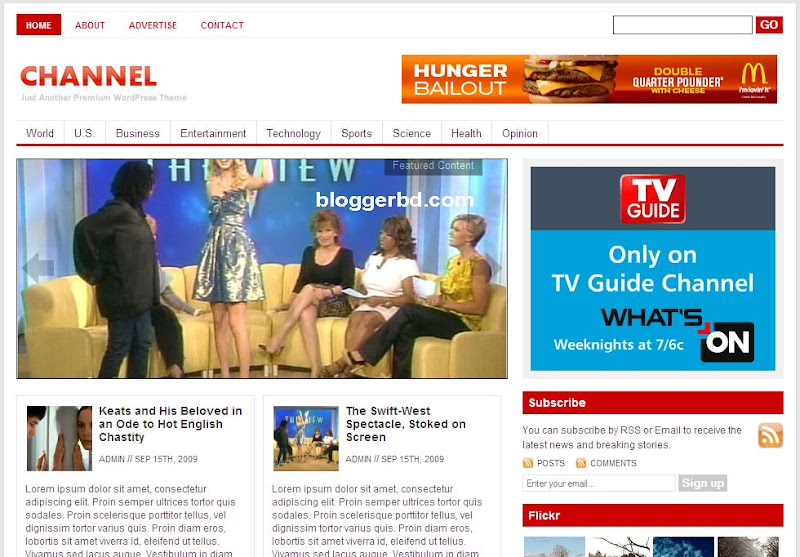
Wodpress theme “Channel” - A attractive Wordpress Magazine theme

First you need to know how to install in local host or web server, This is one of the Wordpress premium theme channel free download, This news magazine you can publish any newspaper

Live Demo: Click here

Download: http://topratedtemplate.blogspot.com/2010/09/channel-wordpress-free-download_26.html

This theme absolutely, everyone have rights to download use it for free!, just download this theme and you can distribute this theme anywhere

Theme Features and details:

3 columns, 3 columns footer, Advanced Theme Control Panel, Automatic Thumbnail Creation by java and other script, Advertisement Management,

Analytics system, Stat Management and Built-in FeedBurner Support, Built-in Flickr Support, Widget Ready, Ads ready, you can youse Gravatar, Threaded Comments Cross-Browser Compatible, support all kinds browser, WordPress 2.8.4+ Compatible, Dropdown Menu Navigation

Source: topratedtemplate.blogspot.com


Channel - wordpress free download


Friday, September 10, 2010

The Professional Template - Blogger Templates free download


The Professional Template is the best Blogger template; Professional Template is one of the best simple blogger templates with simple design here is the feature “ The Professional Template”

Blogger Template Details:

01. This is Multiple Columns

02. Flexible Column

03. Color: White

04. Header Changeable

05. 4 Columns Template

06. 3 Column Footer

07. Accretive Design

08. Easy Nab bar and Manu

09. Read More – Function to short the post

10. Almost all Fonts and Color and Easy Customizable

11. Blog Posts Edit Buttons Functions

12. Faxable Sidebars (by Number)

13. Manu Bar the Headers

14. Tested in all browsers

Download Template


Friday, September 3, 2010

LK Magazine Blogger Template Free download


Template Information and details
Template Name: LK Magazine
Author: Keerthi Bandara
Designer: Lasantha Bandara
Best Browser Support: Internet Explorer 8, Firefox 3.5, Opera 10,Google Chrome
License: This is use to totally free but important thing! Don’t remove Footer Credits Link.

Template Features
This template is very SEO Friendly Blogger Template And also Adsense Ready Template with Fast Page Loading time. This is most beautiful template I ever seen.
Column Type: 4 Columns
Manu and NAV bar: 2 Navigation Bar
1 Multi tab view widget
1 Featured Video section
1 image slider
4 Ads Space
1 CSS Search Box
2 column header
468*60 Header banner
468*60 Header logo
3 Sidebar Gadget section
3 Footer Gadget section
3 Column footer section with rounded corner headers and Auto Read more feature with thumbnails, Related Post feature, Social Bookmarking Widget installed. Breadcrumbs Navigation hack installed. SEO friendly blogger title hack installed, Meta tags installed just put your blog keyword Top Bar with Subscribe buttons and Display Day, Month, Year

For more details about this go here :
To make this template fully worked, Please follow steps below:
1. Sign into your Blogger's dashboard, choose the blog's "layout" .
2. Under "Layout" tab, choose the "Edit HTML" option.
3. You might need to backup the template before you upload it, click "download full template template" to save the template file into the computer.
4. You can see the word "Upload a template from a file on your hard drive.", choose the "(template name).xml" and upload it.

5. Find an image hosting site such as Photo bucket to upload images contained in "Images please upload first!" folder.
6. Go to "Edit HTML" again, find the "IMAGE-LINK-HERE/(image name).jpg" and "IMAGE-LINK-HERE/(image name).png"  and change with the URL of your hosted image.
7. You don't need to host jquery.min.js, because it is hosted by google for you. But if you need to host it yourself you can do so.
8. And also Follow the instruction below. 


Friday, August 6, 2010

Zinmag Remedy v 2.0 free download


@  99% widgetized template
@  Improved CSS and Template structure
@  RSS bar, Carousal panel
@  Video of the day, 125 x 125 ads display and more


You can Download this theme totally free without any charge just Click these download link

Download Link 1

Download Link2

Source: Zinmag Remedy v2.0 free blogger Magazine template


Tuesday, July 6, 2010

Blogger Magazine Blogger Template- free download


Features of this theme:

  • 3 columns
  • Magazine Style
  • Thumbnail images with posts
  • Horizontal Category Navigation
  • Fixed width
  • Widget ready
  • Adsense ready
  • Site-wide 468x60 Homepage Header Adsense banner Ads.
  • Site-wide 300x250 Sidebar Adsense banner Ads.
  • Site-wide 125x125 Sidebar banner ads
  • Most Popular Posts on Sidebar
  • Random Posts on Homepage
  • Recent Posts on inner pages
  • Related Posts with excerpt on inner posts
  • Animated Tag Cloud on Footerbar
  • Thumbnail images on Popular Posts
  • Thumbnail images on Recent/Random Posts
  • Social Bookmarking integrated on inner posts and pages
  • Feedburner Email subscription integrated
  • Cross browser compatible with IE, FF, Opera, Flock & Safari
  • Theme support/customization via our site
  • Wordpress style comment form
To install this template ,follow the steps bellow :
  1. Download template and unzip . You will get file Simplexdarkness.xml and a folder of images .
  2. Upload images to an image hosting service such as Photobucket .
  3. Open template file : BloggerMag.xml in any word editor you have . Change link of images to where you uploaded them. You can change logoName.
  4. Press Ctr+F . Find and replace all link : http://spicytricks.blogspot.com to your blogspot URL .
  5. First Four Blocks are category section that is Label;label
  6. change The label name Windows7 to your desired one.
  7. To change the Category Block Title , find the following lines

    Windows7

    for example the windows7 to desired one.
  8. To change More From This Category,find
    and change the Windows7 to Your desired one

  9. steps 5 to 8 is same for remaining three category blocks.(i’m using Window7(label name as example))
  10. Next,find ,Find and change value of each RSS feed ,ads place . “WelcomeTospicytricks” (my id of feedburner),and change to Your feedburner Name.

    UPDATE Error fixed: 'Recent Post' is dislocated
    1.Open XML coding and find "Recent Articles"( use Ctrl+F)
    2.Find "Var trtd"
    3.Replace The entire line by following.
You Might Like these Animated Image~Link Directory ~For More Live TV - Blogging Tips --Earn Money - for more Click Here --Free Game


VIDEO

ENTER-TAB1-CONTENT-HERE

RECENT POSTS

ENTER-TAB2-CONTENT-HERE

POPULAR POSTS

ENTER-TAB3-CONTENT-HERE
 

Free Template | Blog template | Wordpress Copyright © 2010

Earning Tips Trics -All Thin in 1 Page - LIVE TV - BD TV Star - Bangla Song -Jackson Song - Free Game - Animation Clip - Online Game -Bangla Choti - Pakistani Mujra - Earn Money - Free EBooks - Free Sms Template -Live Cricket - BLOGGER TIPS and Money making Information - Free SMS - Eclectic Diagram - Bangla Sms - Essential Link -Wrestling Video - Technology blog - Miss world's Photo's - Hindi Song -world Largest Link Directory - Tattoo and Body sticker, Air Craft Wallpaper -Video Game - New Directory